> ## Documentation Index
> Fetch the complete documentation index at: https://lemonslice.com/docs/llms.txt
> Use this file to discover all available pages before exploring further.

# Welcome to LemonSlice

<Frame>
  <iframe src="https://www.youtube.com/embed/bQf5h0WD-48" title="LemonSlice product launch video" allow="accelerometer; autoplay; clipboard-write; encrypted-media; gyroscope; picture-in-picture" allowFullScreen />
</Frame>

Build interactive avatars that can listen, talk and respond directly inside your product or website using the LemonSlice API.

✓ [Ultra-low latency](https://lemonslice.com/blog/lemonslice-flash)\
✓ 1000+ concurrency \
✓ Multi-hour long calls\
✓ Instant avatar creation (1 photo) \
✓ 5-minute API setup 

<Card title="Quickstart (5 min)" icon="play" href="/introduction/quickstart" cta="Get started now">
  Build a production-ready avatar app with Next.js + LiveKit in 5 minutes
</Card>

## **The most advanced interactive avatar model**

[**LemonSlice**](https://lemonslice.com/) is an AI research lab that built the world’s first **Character World Model**: interactive characters that talk, listen, and react in real-time based on your conversations. Character World Models are more advanced than traditional real-time avatars, which are based on deepfake or older generative technology.

Here are some of the capabilities of the LemonSlice model:

<Tabs>
  <Tab title="Hand gestures">
    <Frame caption="Hand gestures make avatars more entertaining to watch. LemonSlice is the only interactive avatar provider that has hand gestures.">
      <div className="capability-pair">
        <video className="capability-clip" src="https://mintcdn.com/lemonslice/In5NRFQHKTq5DO3B/videos/capabilities/hands_1.webm?fit=max&auto=format&n=In5NRFQHKTq5DO3B&q=85&s=1cabc46019b74bbefb707b92163fdafa" autoPlay muted loop playsInline data-path="videos/capabilities/hands_1.webm" />

        <video className="capability-clip" src="https://mintcdn.com/lemonslice/In5NRFQHKTq5DO3B/videos/capabilities/hands_2.webm?fit=max&auto=format&n=In5NRFQHKTq5DO3B&q=85&s=155872ab158235c89b476e3f2b4535b9" autoPlay muted loop playsInline data-path="videos/capabilities/hands_2.webm" />
      </div>
    </Frame>
  </Tab>

  <Tab title="Emotions">
    <Frame caption="Control the avatar's emotions on the fly during a conversation.">
      <div className="capability-pair">
        <video className="capability-clip" src="https://mintcdn.com/lemonslice/In5NRFQHKTq5DO3B/videos/capabilities/emotion_1.webm?fit=max&auto=format&n=In5NRFQHKTq5DO3B&q=85&s=db8894fcf07df89fe892f45562b507a3" autoPlay muted loop playsInline data-path="videos/capabilities/emotion_1.webm" />

        <video className="capability-clip" src="https://mintcdn.com/lemonslice/In5NRFQHKTq5DO3B/videos/capabilities/emotion_2.webm?fit=max&auto=format&n=In5NRFQHKTq5DO3B&q=85&s=28372e9335c0d0da553610e114af6cde" autoPlay muted loop playsInline data-path="videos/capabilities/emotion_2.webm" />
      </div>
    </Frame>
  </Tab>

  <Tab title="Objects">
    <Frame caption="Hold and pick up objects naturally">
      <div className="capability-pair">
        <video className="capability-clip" src="https://mintcdn.com/lemonslice/In5NRFQHKTq5DO3B/videos/capabilities/holding_1.webm?fit=max&auto=format&n=In5NRFQHKTq5DO3B&q=85&s=46a634ad89e66bc8a952cfefb20e9735" autoPlay muted loop playsInline data-path="videos/capabilities/holding_1.webm" />

        <video className="capability-clip" src="https://mintcdn.com/lemonslice/In5NRFQHKTq5DO3B/videos/capabilities/holding_2.webm?fit=max&auto=format&n=In5NRFQHKTq5DO3B&q=85&s=3b665758f79209fc3e51667d9de215b5" autoPlay muted loop playsInline data-path="videos/capabilities/holding_2.webm" />
      </div>
    </Frame>
  </Tab>

  <Tab title="Clothing swaps">
    <Frame caption="Change what your avatar is wearing in the middle of a call.">
      <div className="capability-pair">
        <video className="capability-clip" src="https://mintcdn.com/lemonslice/In5NRFQHKTq5DO3B/videos/capabilities/clothing_1.webm?fit=max&auto=format&n=In5NRFQHKTq5DO3B&q=85&s=503ddd8d3a877ccd722a8d4f641f24a5" autoPlay muted loop playsInline data-path="videos/capabilities/clothing_1.webm" />

        <video className="capability-clip" src="https://mintcdn.com/lemonslice/In5NRFQHKTq5DO3B/videos/capabilities/clothing_2.webm?fit=max&auto=format&n=In5NRFQHKTq5DO3B&q=85&s=7f5bf999202e01b4948f59e65e8cf469" autoPlay muted loop playsInline data-path="videos/capabilities/clothing_2.webm" />
      </div>
    </Frame>
  </Tab>

  <Tab title="Physics modeling">
    <Frame caption="Emergent world-modeling, physics simulation, and spatial understanding.">
      <div className="capability-pair">
        <video className="capability-clip" src="https://mintcdn.com/lemonslice/In5NRFQHKTq5DO3B/videos/capabilities/background_1.webm?fit=max&auto=format&n=In5NRFQHKTq5DO3B&q=85&s=eb84b10c99de5452e456ae14263d2c44" autoPlay muted loop playsInline data-path="videos/capabilities/background_1.webm" />

        <video className="capability-clip" src="https://mintcdn.com/lemonslice/In5NRFQHKTq5DO3B/videos/capabilities/background_2.webm?fit=max&auto=format&n=In5NRFQHKTq5DO3B&q=85&s=ec08c54bf16005b99337f7492630da8f" autoPlay muted loop playsInline data-path="videos/capabilities/background_2.webm" />
      </div>
    </Frame>
  </Tab>

  <Tab title="Non-humans and cartoons">
    <Frame caption="Bring any character to life — not just humanoids.">
      <div className="capability-pair">
        <video className="capability-clip" src="https://mintcdn.com/lemonslice/In5NRFQHKTq5DO3B/videos/capabilities/style_1.webm?fit=max&auto=format&n=In5NRFQHKTq5DO3B&q=85&s=e51f73860e119e69d47b3d3b8cb253c6" autoPlay muted loop playsInline data-path="videos/capabilities/style_1.webm" />

        <video className="capability-clip" src="https://mintcdn.com/lemonslice/In5NRFQHKTq5DO3B/videos/capabilities/style_2.webm?fit=max&auto=format&n=In5NRFQHKTq5DO3B&q=85&s=cd2a136376cb5c64025c4dd9c7706915" autoPlay muted loop playsInline data-path="videos/capabilities/style_2.webm" />
      </div>
    </Frame>
  </Tab>

  <Tab title="Full-body movement">
    <Frame caption="LemonSlice is the only interactive avatar provider that animates the entire body. Body movements are also available via [API triggers](/reference/actions).">
      <div className="capability-pair">
        <video className="capability-clip" src="https://mintcdn.com/lemonslice/In5NRFQHKTq5DO3B/videos/capabilities/full_body.webm?fit=max&auto=format&n=In5NRFQHKTq5DO3B&q=85&s=840a61816224da6663973af788609df7" autoPlay muted loop playsInline data-path="videos/capabilities/full_body.webm" />
      </div>
    </Frame>
  </Tab>

  <Tab title="Photorealism">
    <Frame caption="Results that pass the uncanny valley.">
      <div className="capability-pair">
        <video className="capability-clip" src="https://mintcdn.com/lemonslice/In5NRFQHKTq5DO3B/videos/capabilities/photorealism_1.webm?fit=max&auto=format&n=In5NRFQHKTq5DO3B&q=85&s=551b35911ccd5b91275d825001283bec" autoPlay muted loop playsInline data-path="videos/capabilities/photorealism_1.webm" />

        <video className="capability-clip" src="https://mintcdn.com/lemonslice/In5NRFQHKTq5DO3B/videos/capabilities/photorealism_2.webm?fit=max&auto=format&n=In5NRFQHKTq5DO3B&q=85&s=a90f54eace5cea4262e4c8fb5861e3f8" autoPlay muted loop playsInline data-path="videos/capabilities/photorealism_2.webm" />
      </div>
    </Frame>
  </Tab>
</Tabs>

<Tip>
  Create any character from a **single image**. No training or fine-tuning required. Go from image to live video call with that character instantly. 
</Tip>

## How it works

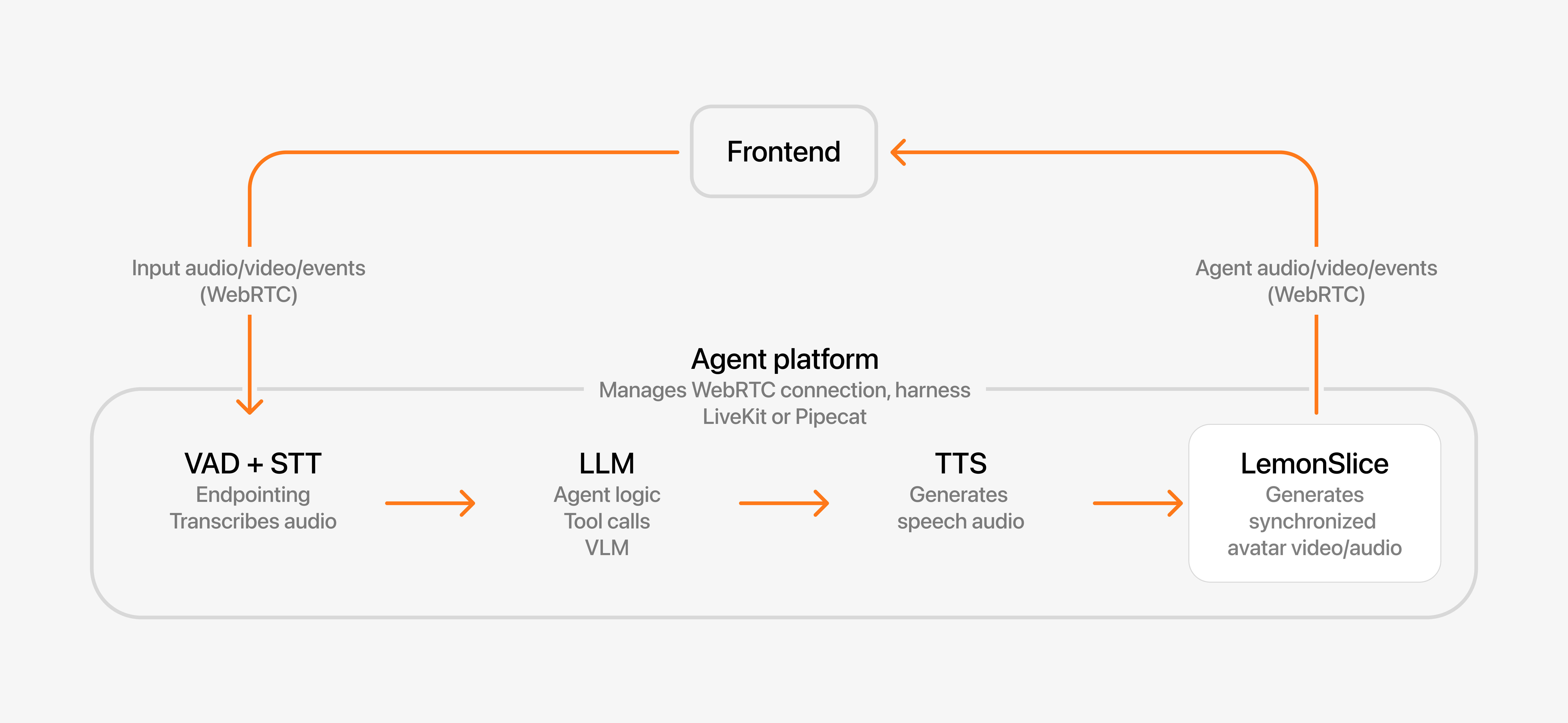
Every real-time conversation with a character goes through the following steps: 

1. A speech-to-text (**STT**) and voice-activity detection (**VAD**) model listen to the user
2. An **LLM** decides what to say back
3. Text-to-speech (**TTS**) turns the reply into audio 
4. **LemonSlice** turns the audio into a real-time video of the character speaking within a live video call

All of this runs within a harness that manages the orchestration and WebRTC connection. LemonSlice connects to all major WebRTC providers to make orchestration easy.

<img src="https://mintcdn.com/lemonslice/In5NRFQHKTq5DO3B/images/self_managed_diagram.png?fit=max&auto=format&n=In5NRFQHKTq5DO3B&q=85&s=3b83ae2d23ec26087275cdac6b9d0df6" alt="Integration diagram" width="6832" height="3152" data-path="images/self_managed_diagram.png" />

The inputs to the LemonSlice API are: 

1. **Image** - defines the appearance of your character.
2. **Audio** - streaming audio from a TTS model like ElevenLabs or Cartesia. This audio is exactly what your character will say.
3. (optional) **Action Engine** -  determines what actions (waving, holding a phone, looking away) the character should take during the conversation. Currently Enterprise only.

<Tip>
  The quality of your avatar is *heavily* determined by your image. See [Avatar Image Tips](https://lemonslice.com/docs/prompting-guide/avatar-image-tips) for framing and posing tips.
</Tip>

## **Integrate real-time avatars into your app**

Add LemonSlice to the stack you already use. LemonSlice integrate with all major WebRTC providers like LiveKit, Daily/Pipecat, and Agora. These providers all have Conversational AI toolkits that make it simple to combine any LLM, TTS, and STT component with LemonSlice.

1. **Pick a framework** — follow the [LiveKit integration](/livekit) or [Pipecat integration](/pipecat) guide.
2. **Build your UI** — run your own call lifecycle and frontend around the avatar session. See [Production checklist](/reference/production-checklist) for call lifecycle patterns.

<Note>
  You can think of LemonSlice like a graphics layer or “face layer” that’s added on top of your voice agent. It is compatible with any TTS and LLM model.
</Note>

Or, use one of the low-code options below to get started with minimal engineering effort. 

<Accordion title="Other integration options">
  The [Widget](/widget/overview) is a no-code solution for adding an avatar to your website. It's like embedding a YouTube video - just 2 lines of code. LemonSlice takes care of everything else.

  The [Hosted Pipeline](/hosted/overview) is a low-code solution. LemonSlice manages the entire avatar and agent infrastructure. You build the UI for the avatar call.

  Here's a comparison of the options:

  |                         | **Self-managed pipeline**     | **Hosted pipeline**          | **Widget**                            |
  | ----------------------- | ----------------------------- | ---------------------------- | ------------------------------------- |
  | **Complexity**          | ⚙️⚙️⚙️ Full code              | ⚙️⚙️ Low code                | ⚙️ No code                            |
  | **You control**         | Speech, Intelligence, Call UI | Call UI                      | Nothing                               |
  | **LemonSlice controls** | Avatar                        | Speech, Intelligence, Avatar | Speech, Intelligence, Avatar, Call UI |
</Accordion>

## Try the live demo

<Frame>
  <a className="playground-demo-link" href="https://lemonslice.com">
    <video className="hero-video" src="https://mintcdn.com/lemonslice/In5NRFQHKTq5DO3B/videos/hero.webm?fit=max&auto=format&n=In5NRFQHKTq5DO3B&q=85&s=50c8d52ef0dae51a2244d7f25be30d3a" autoPlay muted loop playsInline data-path="videos/hero.webm" />

    <span className="playground-demo-overlay">
      <span className="playground-demo-label">Full demo on lemonslice.com</span>
    </span>
  </a>
</Frame>