> ## Documentation Index
> Fetch the complete documentation index at: https://lemonslice.com/docs/llms.txt
> Use this file to discover all available pages before exploring further.
# Production checklist for deploying LemonSlice avatars
> Production checklist for deploying LemonSlice avatars
Clip from our [home page playground demo](https://lemonslice.com/) — a LiveKit agent built with the checklist on this page. We wrote these recommendations based on what we learned shipping it.
## Budget your latency
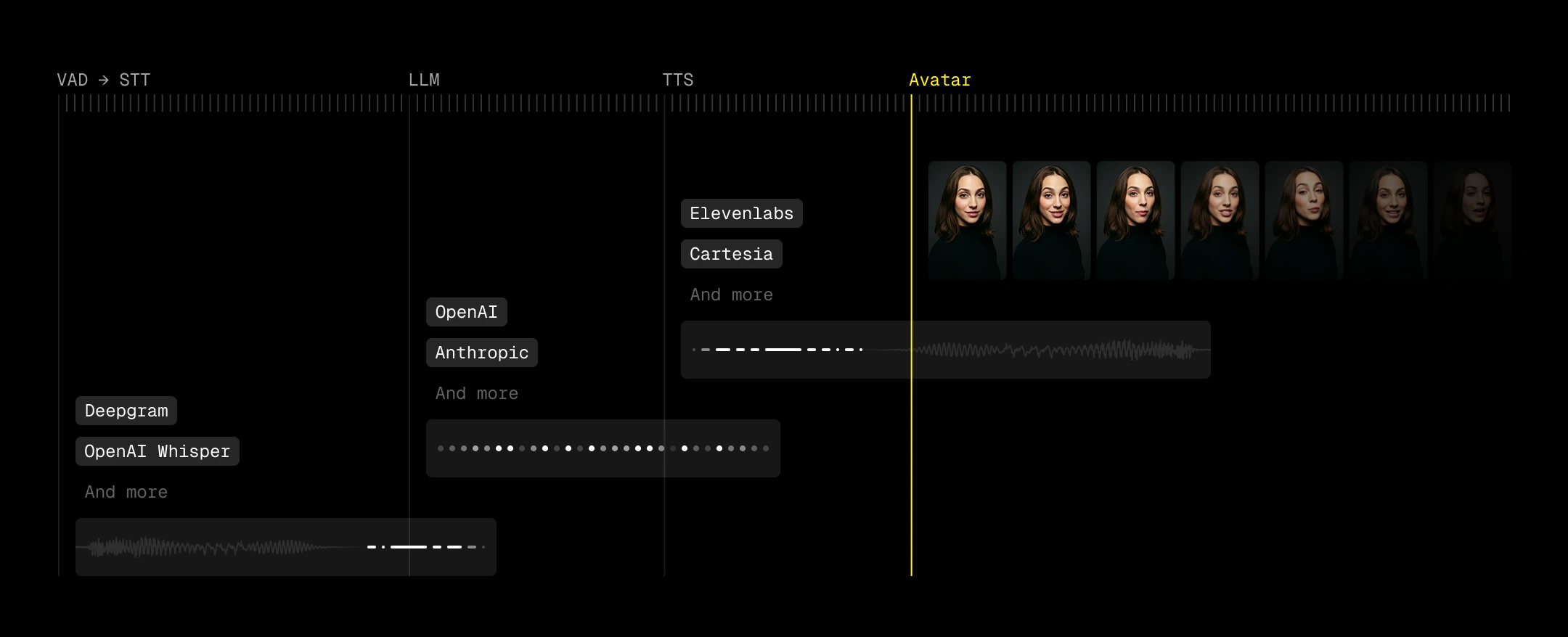 Humans expect a response quickly. The longer your agent takes to respond, the more likely the conversation breaks down.
The LLM step is usually the biggest risk. Response times can creep from sub-second to three or four seconds as you add function calls, reasoning, or multimodal inputs. Set a latency target upfront and treat every feature as a tradeoff against that budget. If something takes too long, move it off the critical path — run it asynchronously, tell the user it may take a while, or defer it entirely.
As you build, measure the length and latency of each pipeline step (STT, LLM, TTS, and avatar video generation).
## Use VAD to decrease perceived latency
Perceived latency matters more than absolute latency. Voice Activity Detection (VAD) lets you start reacting before a user has fully finished speaking, which effectively pulls your entire pipeline forward. Good turn detection means you can kick off generation as soon as intent is clear.
## Optional: Show a transcription
Displaying transcription can improve usability, especially for catching STT errors and making the agent's timing feel more predictable. Users can see when their speech has been "accepted," which reduces ambiguity around when the agent will respond.
However, transcription introduces its own UX risks. Many pipelines expose both fast, low-accuracy interim results and slower, higher-accuracy final transcripts (e.g., `interim_results=false` to suppress partials for Deepgram). When both are surfaced, users can see text rapidly change or correct itself, which feels unstable and undermines trust. We recommend disabling interim results if you choose to show transcriptions.
***
## Handle avatar connect/disconnect events
**Read this section if you experience any of the following issues:**
* Empty room (user sees black screen)
* User gets no video or audio, but audio/text input are still active
* Avatar disappears
* Avatar is delayed in speaking
Listen for `bot_ready` on the frontend to switch from a **ringing** state to your **active call** UI. Listen for the avatar leaving to return to an **inactive** state so users can rejoin.
LemonSlice fires `bot_ready` when the avatar has joined the room and video frames are visible — not when the participant first connects. Stay in a ringing/loading state until `bot_ready` to avoid showing a black screen.
A phone-call metaphor works well here: users understand ringing, pickup, conversation, and hang-up. LemonSlice videos take around five seconds to initialize, so a ringing or loading state with optional audio gives users clear feedback while the avatar warms up.
Also listen for `ParticipantDisconnected` when the avatar leaves (call completion, idle timeout, errors, etc.).
On the backend, listen for these events and call `agent_session.generate_reply()` when the LemonSlice avatar joins to prevent idle time before the avatar speaks. See the [LiveKit starter project](https://github.com/lemonsliceai/lemonslice-examples/tree/main/03-livekit-app-python) for a complete implementation.
```javascript theme={null}
import { Room, RoomEvent } from "livekit-client";
const AVATAR_IDENTITY = "lemonslice-avatar-agent";
const LEMONSLICE_RPC_TOPIC = "lemonslice";
const room = new Room(...);
room.on(RoomEvent.DataReceived, (payload, participant, kind, topic) => {
if (topic !== LEMONSLICE_RPC_TOPIC) return;
try {
const data = JSON.parse(new TextDecoder().decode(payload));
if (data?.type === "bot_ready") {
// Swap to active call UI
}
} catch (e) {
console.warn("Unable to decode LemonSlice RPC JSON", e);
}
});
room.on(RoomEvent.ParticipantDisconnected, (participant) => {
if (participant.identity === AVATAR_IDENTITY) {
room.disconnect();
// Swap to inactive call UI — user can rejoin from here
}
});
```
LemonSlice events arrive on Daily's `app-message` channel. When the agent participant leaves, handle `participant-left` to reset your UI.
See the [hosted Daily starter project](https://github.com/lemonsliceai/lemonslice-examples/tree/main/01-hosted-daily-app) for a full React implementation.
```javascript theme={null}
import { useDailyEvent } from "@daily-co/daily-react";
import { useCallback } from "react";
useDailyEvent(
"app-message",
useCallback((ev) => {
if (ev?.data?.type === "bot_ready") {
// Swap to active call UI
}
if (ev?.data?.type === "idle_timeout") {
// Agent stopped due to inactivity — swap to inactive call UI
}
}, [])
);
useDailyEvent("participant-left", (ev) => {
if (ev.participant?.user_name === "LemonSlice Agent") {
// Swap to inactive call UI — user can start a new room
}
});
```
***
## Handle room errors
**Read this section if you experience any of the following issues:**
* Avatar fails to join a call
* Crashed calls — avatar leaves or audio cuts out
Listen for `Disconnected` events to handle network errors, WebRTC failures, or join failures.
```javascript theme={null}
import { DisconnectReason, RoomEvent } from "livekit-client";
room.on(RoomEvent.Disconnected, (reason) => {
switch (reason) {
case DisconnectReason.CLIENT_INITIATED:
// User ended the call — swap to inactive call UI
break;
default:
// Unexpected disconnect — swap to inactive call UI
}
});
```
Listen for `daily_error` app-messages and Daily's top-level error/left events.
```javascript theme={null}
useDailyEvent("app-message", (ev) => {
if (ev?.data?.type === "daily_error") {
console.error(ev.data.error, ev.data.fatal);
// Swap to inactive call UI if fatal
}
});
useDailyEvent("error", (ev) => {
console.error("Daily error:", ev);
// Swap to inactive call UI
});
```
***
## Catch pipeline errors
**Read this section if you experience any of the following issues:**
* Avatar does not speak
* Session dies unexpectedly
Subscribe to `AgentSession` error events on your backend. Errors with `err.recoverable == False` mean the pipeline is dead — end the session gracefully.
```python theme={null}
@session.on("error")
def on_session_error(ev: ErrorEvent) -> None:
err = ev.error
if isinstance(err, TTSError):
logger.error("AgentSession TTS error", exc_info=err.error)
elif isinstance(err, STTError):
logger.error("AgentSession STT error", exc_info=err.error)
elif isinstance(err, LLMError):
logger.error("AgentSession LLM error", exc_info=err.error)
else:
logger.error("AgentSession error", exc_info=err.error)
```
The Hosted Pipeline manages STT, LLM, and TTS for you. Monitor pipeline issues on the frontend via LemonSlice app-messages — especially `daily_error` and `video_generation_error`. See the [event reference](/hosted/integrations/daily-room-integration#receiving-events) for the full list.
***
## Handle startup failures
**Read this section if you experience any of the following issues:**
* The call never connects
If the avatar fails to join, give users a way to exit gracefully instead of waiting indefinitely.
The [LiveKit starter project](https://github.com/lemonsliceai/lemonslice-examples/tree/main/03-livekit-app-python) monitors agent startup and can send a failure message to the room. Catch it on the frontend:
```javascript theme={null}
const ROOM_MESSAGE_TOPIC = "lemonslice/message";
room.on(RoomEvent.DataReceived, (payload, participant, kind, topic) => {
if (topic !== ROOM_MESSAGE_TOPIC) return;
try {
const message = JSON.parse(new TextDecoder().decode(payload));
if (message.type === "startup_failure") {
room.disconnect();
// Swap to inactive call UI — user can retry
}
} catch (err) {
console.error("Failed to parse data packet:", err);
}
});
```
Set a client-side timeout after creating the room. If `bot_ready` has not fired within your threshold (e.g. 30 seconds), call `leave()` and show a retry UI. Also handle `daily_error` with `fatal: true` during startup.
***
## Check timeouts
**Read this section if you experience any of the following issues:**
* Avatar suddenly exits a call
* Calls end after the same number of minutes every time
Several timeouts can affect a session. Confirm each is set to the value you intend:
* **LemonSlice idle timeout** (default 60 seconds) — resets when the avatar is talking
* **LemonSlice GPU timeout** (default 30 minutes) — contact [support@lemonslice.com](mailto:support@lemonslice.com) if you need longer calls
* **Third-party timeouts** (LiveKit, Daily, ElevenLabs, etc.)
Set `idle_timeout` on `AvatarSession`:
Setting `idle_timeout` to `-1` disables the LemonSlice idle timeout. Ensure sessions are properly terminated to avoid stale calls and runaway billing.
```python theme={null}
avatar = lemonslice.AvatarSession(
agent_image_url="....",
agent_prompt="a person talking.",
idle_timeout=600,
)
session_id = await avatar.start(session, room=ctx.room)
```
Idle timeout is configured on your agent in the [LemonSlice web app](https://lemonslice.com/agents). When it fires, you'll receive an `idle_timeout` app-message — use it to reset your UI.
End sessions explicitly with a `force-end` control event when the user hangs up:
```javascript theme={null}
sendAppMessage({ event: "force-end" }, "*");
```
Humans expect a response quickly. The longer your agent takes to respond, the more likely the conversation breaks down.
The LLM step is usually the biggest risk. Response times can creep from sub-second to three or four seconds as you add function calls, reasoning, or multimodal inputs. Set a latency target upfront and treat every feature as a tradeoff against that budget. If something takes too long, move it off the critical path — run it asynchronously, tell the user it may take a while, or defer it entirely.
As you build, measure the length and latency of each pipeline step (STT, LLM, TTS, and avatar video generation).
## Use VAD to decrease perceived latency
Perceived latency matters more than absolute latency. Voice Activity Detection (VAD) lets you start reacting before a user has fully finished speaking, which effectively pulls your entire pipeline forward. Good turn detection means you can kick off generation as soon as intent is clear.
## Optional: Show a transcription
Displaying transcription can improve usability, especially for catching STT errors and making the agent's timing feel more predictable. Users can see when their speech has been "accepted," which reduces ambiguity around when the agent will respond.
However, transcription introduces its own UX risks. Many pipelines expose both fast, low-accuracy interim results and slower, higher-accuracy final transcripts (e.g., `interim_results=false` to suppress partials for Deepgram). When both are surfaced, users can see text rapidly change or correct itself, which feels unstable and undermines trust. We recommend disabling interim results if you choose to show transcriptions.
***
## Handle avatar connect/disconnect events
**Read this section if you experience any of the following issues:**
* Empty room (user sees black screen)
* User gets no video or audio, but audio/text input are still active
* Avatar disappears
* Avatar is delayed in speaking
Listen for `bot_ready` on the frontend to switch from a **ringing** state to your **active call** UI. Listen for the avatar leaving to return to an **inactive** state so users can rejoin.
LemonSlice fires `bot_ready` when the avatar has joined the room and video frames are visible — not when the participant first connects. Stay in a ringing/loading state until `bot_ready` to avoid showing a black screen.
A phone-call metaphor works well here: users understand ringing, pickup, conversation, and hang-up. LemonSlice videos take around five seconds to initialize, so a ringing or loading state with optional audio gives users clear feedback while the avatar warms up.
Also listen for `ParticipantDisconnected` when the avatar leaves (call completion, idle timeout, errors, etc.).
On the backend, listen for these events and call `agent_session.generate_reply()` when the LemonSlice avatar joins to prevent idle time before the avatar speaks. See the [LiveKit starter project](https://github.com/lemonsliceai/lemonslice-examples/tree/main/03-livekit-app-python) for a complete implementation.
```javascript theme={null}
import { Room, RoomEvent } from "livekit-client";
const AVATAR_IDENTITY = "lemonslice-avatar-agent";
const LEMONSLICE_RPC_TOPIC = "lemonslice";
const room = new Room(...);
room.on(RoomEvent.DataReceived, (payload, participant, kind, topic) => {
if (topic !== LEMONSLICE_RPC_TOPIC) return;
try {
const data = JSON.parse(new TextDecoder().decode(payload));
if (data?.type === "bot_ready") {
// Swap to active call UI
}
} catch (e) {
console.warn("Unable to decode LemonSlice RPC JSON", e);
}
});
room.on(RoomEvent.ParticipantDisconnected, (participant) => {
if (participant.identity === AVATAR_IDENTITY) {
room.disconnect();
// Swap to inactive call UI — user can rejoin from here
}
});
```
LemonSlice events arrive on Daily's `app-message` channel. When the agent participant leaves, handle `participant-left` to reset your UI.
See the [hosted Daily starter project](https://github.com/lemonsliceai/lemonslice-examples/tree/main/01-hosted-daily-app) for a full React implementation.
```javascript theme={null}
import { useDailyEvent } from "@daily-co/daily-react";
import { useCallback } from "react";
useDailyEvent(
"app-message",
useCallback((ev) => {
if (ev?.data?.type === "bot_ready") {
// Swap to active call UI
}
if (ev?.data?.type === "idle_timeout") {
// Agent stopped due to inactivity — swap to inactive call UI
}
}, [])
);
useDailyEvent("participant-left", (ev) => {
if (ev.participant?.user_name === "LemonSlice Agent") {
// Swap to inactive call UI — user can start a new room
}
});
```
***
## Handle room errors
**Read this section if you experience any of the following issues:**
* Avatar fails to join a call
* Crashed calls — avatar leaves or audio cuts out
Listen for `Disconnected` events to handle network errors, WebRTC failures, or join failures.
```javascript theme={null}
import { DisconnectReason, RoomEvent } from "livekit-client";
room.on(RoomEvent.Disconnected, (reason) => {
switch (reason) {
case DisconnectReason.CLIENT_INITIATED:
// User ended the call — swap to inactive call UI
break;
default:
// Unexpected disconnect — swap to inactive call UI
}
});
```
Listen for `daily_error` app-messages and Daily's top-level error/left events.
```javascript theme={null}
useDailyEvent("app-message", (ev) => {
if (ev?.data?.type === "daily_error") {
console.error(ev.data.error, ev.data.fatal);
// Swap to inactive call UI if fatal
}
});
useDailyEvent("error", (ev) => {
console.error("Daily error:", ev);
// Swap to inactive call UI
});
```
***
## Catch pipeline errors
**Read this section if you experience any of the following issues:**
* Avatar does not speak
* Session dies unexpectedly
Subscribe to `AgentSession` error events on your backend. Errors with `err.recoverable == False` mean the pipeline is dead — end the session gracefully.
```python theme={null}
@session.on("error")
def on_session_error(ev: ErrorEvent) -> None:
err = ev.error
if isinstance(err, TTSError):
logger.error("AgentSession TTS error", exc_info=err.error)
elif isinstance(err, STTError):
logger.error("AgentSession STT error", exc_info=err.error)
elif isinstance(err, LLMError):
logger.error("AgentSession LLM error", exc_info=err.error)
else:
logger.error("AgentSession error", exc_info=err.error)
```
The Hosted Pipeline manages STT, LLM, and TTS for you. Monitor pipeline issues on the frontend via LemonSlice app-messages — especially `daily_error` and `video_generation_error`. See the [event reference](/hosted/integrations/daily-room-integration#receiving-events) for the full list.
***
## Handle startup failures
**Read this section if you experience any of the following issues:**
* The call never connects
If the avatar fails to join, give users a way to exit gracefully instead of waiting indefinitely.
The [LiveKit starter project](https://github.com/lemonsliceai/lemonslice-examples/tree/main/03-livekit-app-python) monitors agent startup and can send a failure message to the room. Catch it on the frontend:
```javascript theme={null}
const ROOM_MESSAGE_TOPIC = "lemonslice/message";
room.on(RoomEvent.DataReceived, (payload, participant, kind, topic) => {
if (topic !== ROOM_MESSAGE_TOPIC) return;
try {
const message = JSON.parse(new TextDecoder().decode(payload));
if (message.type === "startup_failure") {
room.disconnect();
// Swap to inactive call UI — user can retry
}
} catch (err) {
console.error("Failed to parse data packet:", err);
}
});
```
Set a client-side timeout after creating the room. If `bot_ready` has not fired within your threshold (e.g. 30 seconds), call `leave()` and show a retry UI. Also handle `daily_error` with `fatal: true` during startup.
***
## Check timeouts
**Read this section if you experience any of the following issues:**
* Avatar suddenly exits a call
* Calls end after the same number of minutes every time
Several timeouts can affect a session. Confirm each is set to the value you intend:
* **LemonSlice idle timeout** (default 60 seconds) — resets when the avatar is talking
* **LemonSlice GPU timeout** (default 30 minutes) — contact [support@lemonslice.com](mailto:support@lemonslice.com) if you need longer calls
* **Third-party timeouts** (LiveKit, Daily, ElevenLabs, etc.)
Set `idle_timeout` on `AvatarSession`:
Setting `idle_timeout` to `-1` disables the LemonSlice idle timeout. Ensure sessions are properly terminated to avoid stale calls and runaway billing.
```python theme={null}
avatar = lemonslice.AvatarSession(
agent_image_url="....",
agent_prompt="a person talking.",
idle_timeout=600,
)
session_id = await avatar.start(session, room=ctx.room)
```
Idle timeout is configured on your agent in the [LemonSlice web app](https://lemonslice.com/agents). When it fires, you'll receive an `idle_timeout` app-message — use it to reset your UI.
End sessions explicitly with a `force-end` control event when the user hangs up:
```javascript theme={null}
sendAppMessage({ event: "force-end" }, "*");
```