> ## Documentation Index
> Fetch the complete documentation index at: https://lemonslice.com/docs/llms.txt
> Use this file to discover all available pages before exploring further.
# Customizing the widget
#### agent-id (required)
Your LemonSlice agent ID.
```html HTML theme={null}
```
## States and sizing
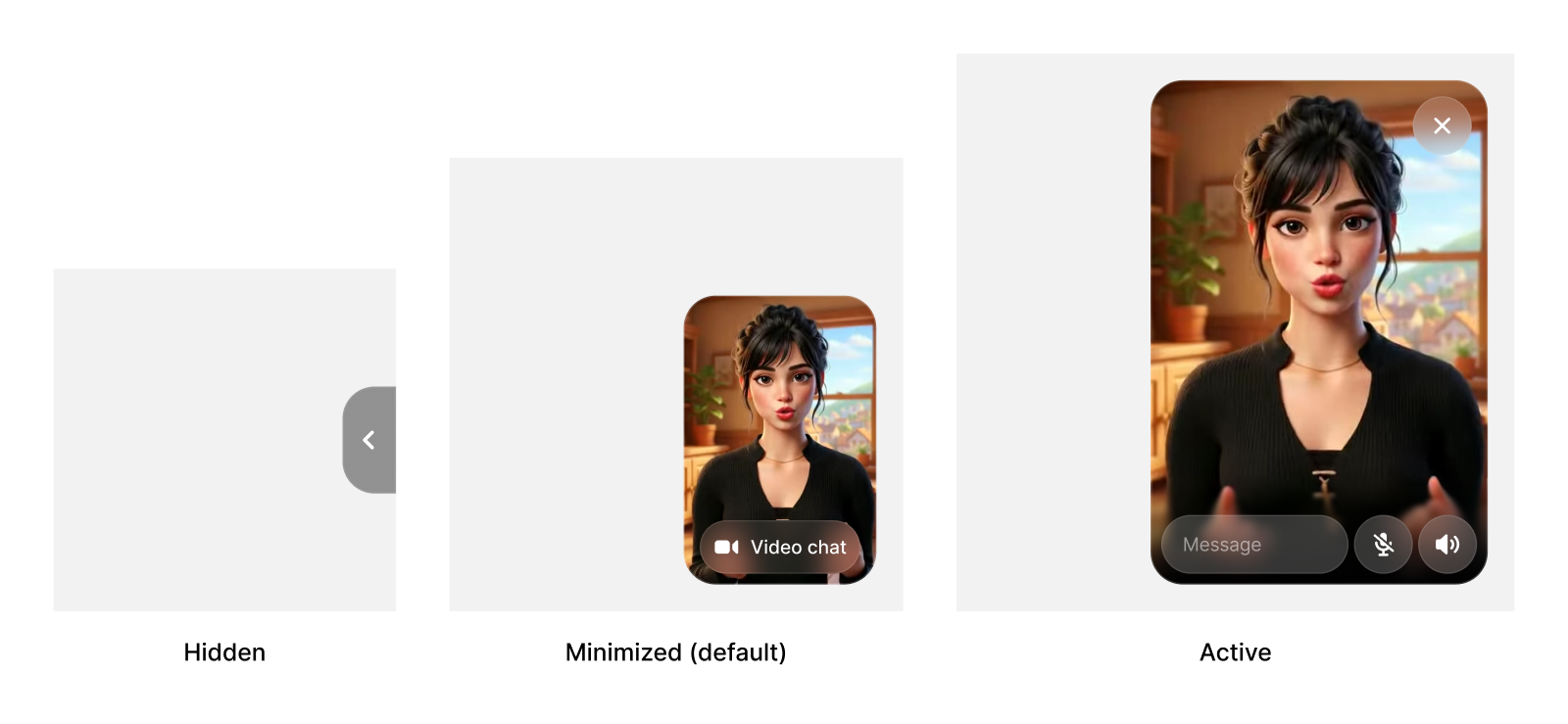
Users can switch between the hidden, minimized, and active states. You can set the default state and the sizes for each state for the widget.
 #### initial-state
Initial widget state on load. Options: `"minimized"`, `"active"`, or `"hidden"`. Default: `"minimized"`.
```html HTML theme={null}
```
#### controlled-widget-state
Dynamically control widget state. Options: `"minimized"`, `"active"`, or `"hidden"`.
```html HTML theme={null}
```
Control the widget dynamically by updating attributes with JavaScript:
```javascript JAVASCRIPT theme={null}
const widget = document.querySelector('lemon-slice-widget');
// Change widget state
widget.setAttribute('controlled-widget-state', 'active');
// Toggle minimize button
widget.setAttribute('controlled-show-minimize-button', 'false');
```
#### initial-state
Initial widget state on load. Options: `"minimized"`, `"active"`, or `"hidden"`. Default: `"minimized"`.
```html HTML theme={null}
```
#### controlled-widget-state
Dynamically control widget state. Options: `"minimized"`, `"active"`, or `"hidden"`.
```html HTML theme={null}
```
Control the widget dynamically by updating attributes with JavaScript:
```javascript JAVASCRIPT theme={null}
const widget = document.querySelector('lemon-slice-widget');
// Change widget state
widget.setAttribute('controlled-widget-state', 'active');
// Toggle minimize button
widget.setAttribute('controlled-show-minimize-button', 'false');
```
 #### custom-active-width
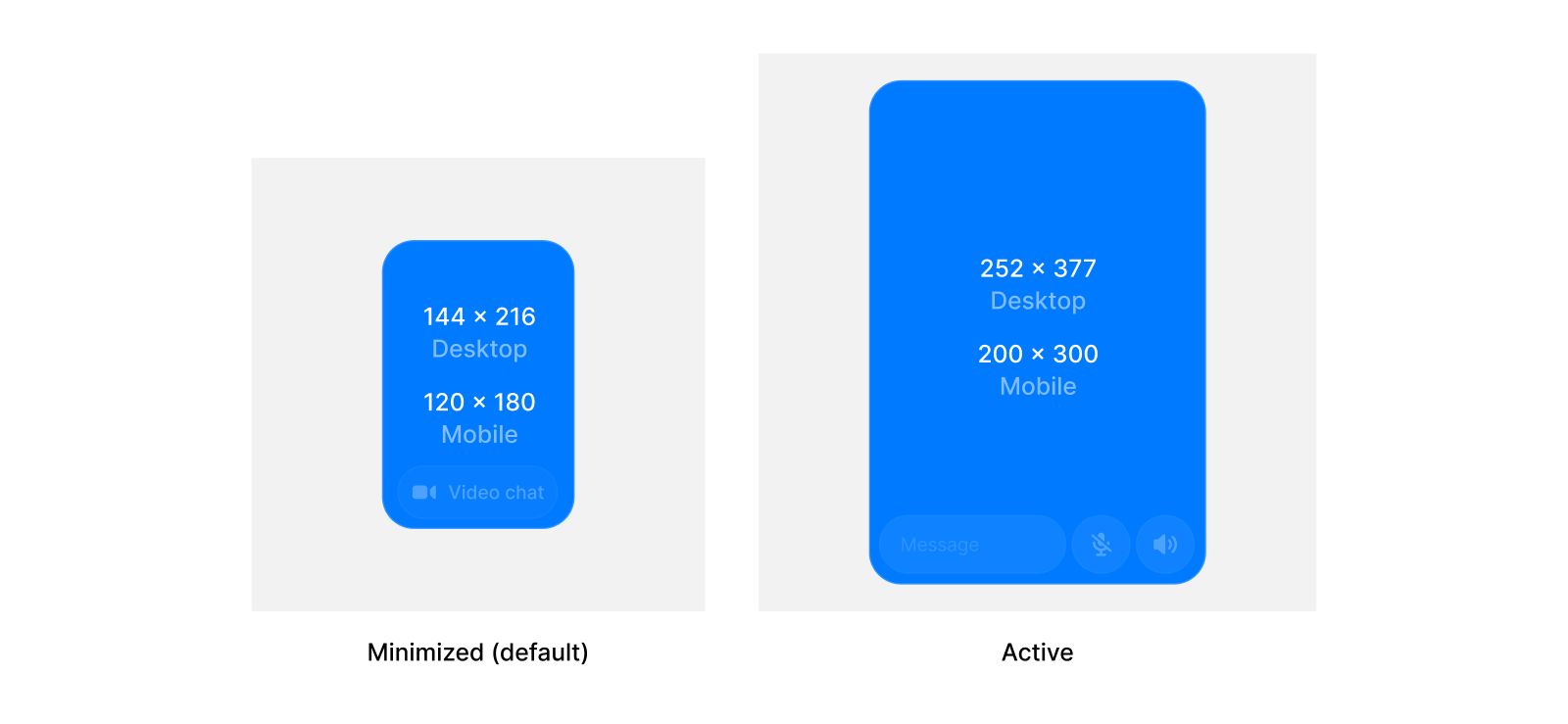
Custom width for the active widget state in pixels.
```html HTML theme={null}
```
#### custom-active-height
Custom height for the active widget state in pixels.
```html HTML theme={null}
```
#### custom-minimized-width
Custom width for the minimized widget state in pixels.
```html HTML theme={null}
```
#### custom-minimized-height
Custom height for the minimized widget state in pixels.
```html HTML theme={null}
```
## Styling
#### inline
Display widget inline instead of floating. Default: `false`.
```html HTML theme={null}
```
#### hide-ui
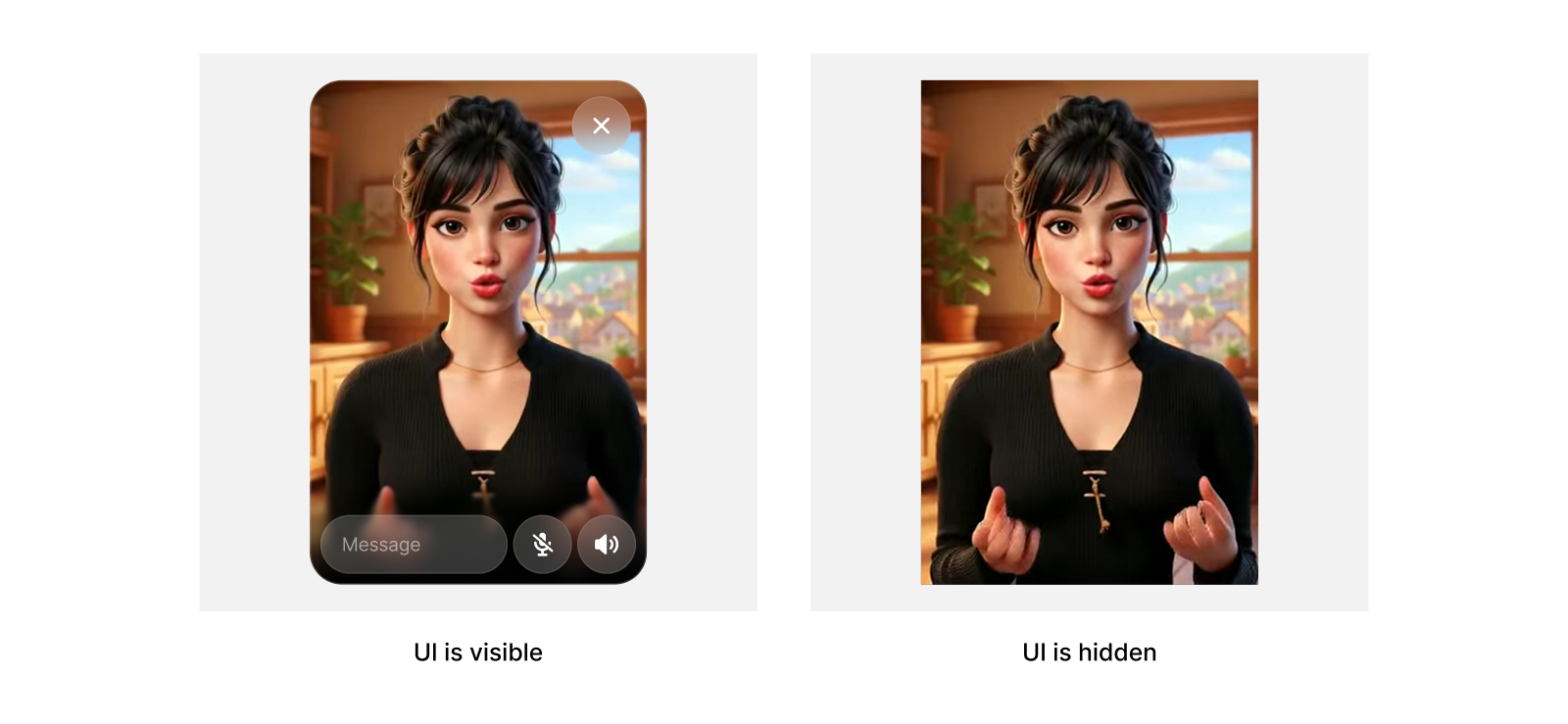
Hides all UI, while keeping sizing logic. Useful for if you want to build your own message UI.
```html HTML theme={null}
```
#### custom-active-width
Custom width for the active widget state in pixels.
```html HTML theme={null}
```
#### custom-active-height
Custom height for the active widget state in pixels.
```html HTML theme={null}
```
#### custom-minimized-width
Custom width for the minimized widget state in pixels.
```html HTML theme={null}
```
#### custom-minimized-height
Custom height for the minimized widget state in pixels.
```html HTML theme={null}
```
## Styling
#### inline
Display widget inline instead of floating. Default: `false`.
```html HTML theme={null}
```
#### hide-ui
Hides all UI, while keeping sizing logic. Useful for if you want to build your own message UI.
```html HTML theme={null}
```
 #### controlled-show-minimize-button
Dynamically control minimize button visibility. Options: `"true"` or `"false"`.
```html HTML theme={null}
```
#### show-minimize-button
Show or hide the minimize button on hover. Default: `true`.
```html HTML theme={null}
```
#### video-button-color-hex
Hex color (with or without `#`) used for the minimized video chat button. Default: `#919191`.
```html HTML theme={null}
```
#### video-button-color-opacity
Opacity for the video chat button color in the range `[0, 1]`. Default: `0.3`.
```html HTML theme={null}
```
## Examples
### Start expanded
```html HTML theme={null}
```
### Custom button color
```html HTML theme={null}
```
### Custom widget sizes
```html HTML theme={null}
```
#### controlled-show-minimize-button
Dynamically control minimize button visibility. Options: `"true"` or `"false"`.
```html HTML theme={null}
```
#### show-minimize-button
Show or hide the minimize button on hover. Default: `true`.
```html HTML theme={null}
```
#### video-button-color-hex
Hex color (with or without `#`) used for the minimized video chat button. Default: `#919191`.
```html HTML theme={null}
```
#### video-button-color-opacity
Opacity for the video chat button color in the range `[0, 1]`. Default: `0.3`.
```html HTML theme={null}
```
## Examples
### Start expanded
```html HTML theme={null}
```
### Custom button color
```html HTML theme={null}
```
### Custom widget sizes
```html HTML theme={null}
```