

Budget your latency
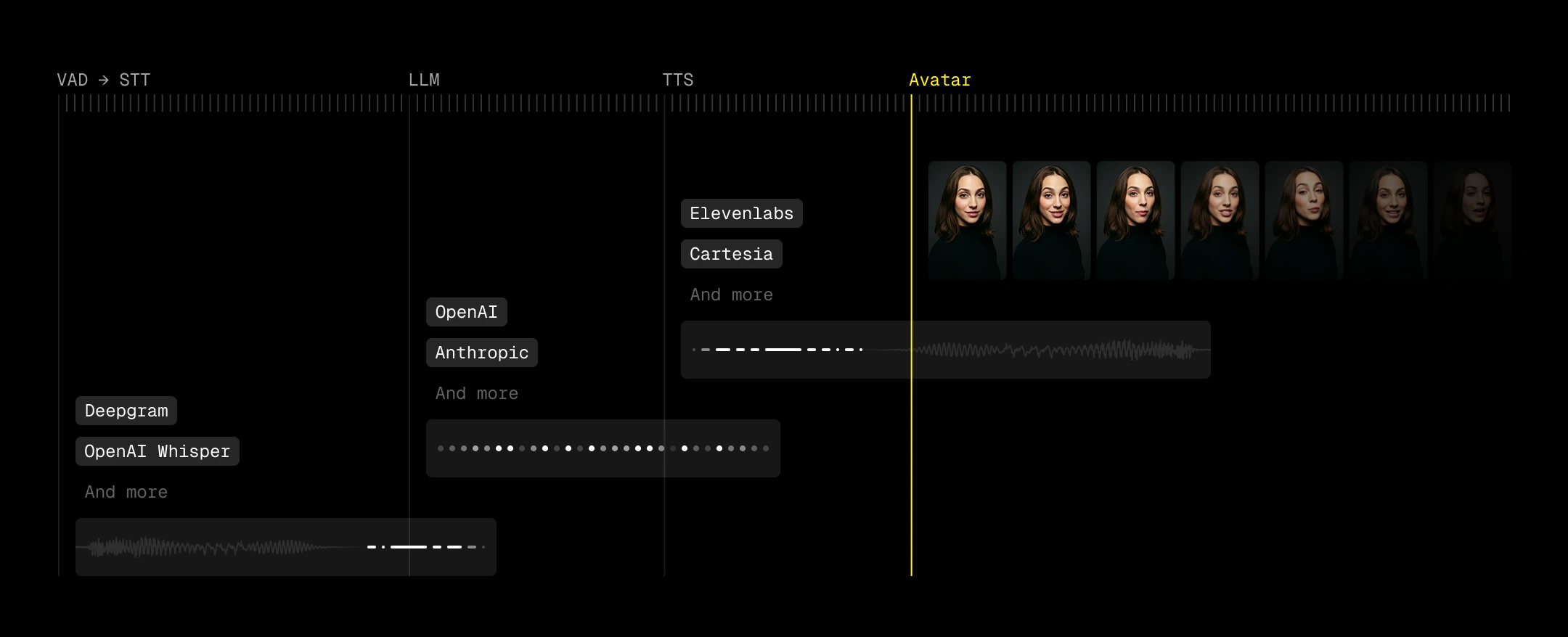
Use VAD to decrease perceived latency
Perceived latency matters more than absolute latency. Voice Activity Detection (VAD) lets you start reacting before a user has fully finished speaking, which effectively pulls your entire pipeline forward. Good turn detection means you can kick off generation as soon as intent is clear.Optional: Show a transcription
Displaying transcription can improve usability, especially for catching STT errors and making the agent’s timing feel more predictable. Users can see when their speech has been “accepted,” which reduces ambiguity around when the agent will respond. However, transcription introduces its own UX risks. Many pipelines expose both fast, low-accuracy interim results and slower, higher-accuracy final transcripts (e.g.,interim_results=false to suppress partials for Deepgram). When both are surfaced, users can see text rapidly change or correct itself, which feels unstable and undermines trust. We recommend disabling interim results if you choose to show transcriptions.
Handle avatar connect/disconnect events
Read this section if you experience any of the following issues:
- Empty room (user sees black screen)
- User gets no video or audio, but audio/text input are still active
- Avatar disappears
- Avatar is delayed in speaking
bot_ready on the frontend to switch from a ringing state to your active call UI. Listen for the avatar leaving to return to an inactive state so users can rejoin.
LemonSlice fires bot_ready when the avatar has joined the room and video frames are visible — not when the participant first connects. Stay in a ringing/loading state until bot_ready to avoid showing a black screen.
A phone-call metaphor works well here: users understand ringing, pickup, conversation, and hang-up. LemonSlice videos take around five seconds to initialize, so a ringing or loading state with optional audio gives users clear feedback while the avatar warms up.
- LiveKit
- Daily (Hosted)
Also listen for
ParticipantDisconnected when the avatar leaves (call completion, idle timeout, errors, etc.).On the backend, listen for these events and call
agent_session.generate_reply() when the LemonSlice avatar joins to prevent idle time before the avatar speaks. See the LiveKit starter project for a complete implementation.Handle room errors
Read this section if you experience any of the following issues:
- Avatar fails to join a call
- Crashed calls — avatar leaves or audio cuts out
- LiveKit
- Daily (Hosted)
Listen for
Disconnected events to handle network errors, WebRTC failures, or join failures.Catch pipeline errors
Read this section if you experience any of the following issues:
- Avatar does not speak
- Session dies unexpectedly
- LiveKit
- Daily (Hosted)
Subscribe to
AgentSession error events on your backend. Errors with err.recoverable == False mean the pipeline is dead — end the session gracefully.Handle startup failures
Read this section if you experience any of the following issues:
- The call never connects
- LiveKit
- Daily (Hosted)
The LiveKit starter project monitors agent startup and can send a failure message to the room. Catch it on the frontend:
Check timeouts
Read this section if you experience any of the following issues:
- Avatar suddenly exits a call
- Calls end after the same number of minutes every time
- LemonSlice idle timeout (default 60 seconds) — resets when the avatar is talking
- LemonSlice GPU timeout (default 30 minutes) — contact support@lemonslice.com if you need longer calls
- Third-party timeouts (LiveKit, Daily, ElevenLabs, etc.)
- LiveKit
- Daily (Hosted)
Set
idle_timeout on AvatarSession: