
Articles · Sep 11, 2026
Akool Review 2026: Features, Pricing, and How It Compares
An honest Akool review for 2026: what the avatar video suite and Streaming Avatar do well, where they fall short, pricing by plan, and how it compares for interactive avatars.
This review is for teams deciding whether Akool fits their next avatar project. We looked at both sides of the product: the pre-rendered suite that generates avatar videos, talking photos, face swaps, and translated clips, and the real-time side built around Streaming Avatar.
Along the way we checked avatar creation, expressiveness, latency, languages, output quality, and pricing, using Akool's own product pages as the source for every fact. Where Akool does something well, we say so, and where it falls short, we say that too.
What is Akool?
Akool calls itself a premium AI video suite. It sells to marketing, education, and e-commerce teams that want to produce video content without a camera crew.
The account bundles many tools, and most of them make finished media. Avatar Video renders a clip of a talking presenter from a script, Talking Photo animates a single picture so it speaks, Face Swap replaces faces in images and video, and Video Translation re-voices footage into other languages with matching lip movement. Streaming Avatar is the one real-time product, a digital human that holds live conversations with users on websites, apps, and event screens. Akool reports more than 300 million assets generated to date.
The platform is also a model hub, which means the same account can generate video with third-party models like Kling, Seedance, and Google Veo alongside Akool's own. Everything draws from one pool of monthly credits, and an API covers most of the suite.
Pre-rendered vs. interactive avatars
Since Akool sells both pre-rendered and interactive avatars, it helps to understand the difference between the two before we go feature by feature.
A pre-rendered avatar video is made ahead of time. You write a script, pick a presenter, and the platform produces a finished clip, so every viewer watches the same video. An interactive avatar is closer to a video call. The character is generated during the conversation itself, which means it listens while you talk, works out a reply, and says it back to you in real time.
| Pre-rendered avatar video | Interactive avatar | |
|---|---|---|
| What it is | A finished clip produced from a script before anyone watches it | A character generated live during the conversation |
| Akool's product | Avatar Video, Talking Photo, Face Swap, and Video Translation | Streaming Avatar |
| How you interact | Playback only, the same clip for every viewer | Two-way, it answers you like a video call |
| Typical uses | Marketing clips, training, translated video, social content | Support, sales demos, tutoring, kiosks |
Akool ships both, and most of its catalog is pre-rendered, because the swap tools, the templates, and the credit math all revolve around finished media. Streaming Avatar carries the interactive avatars on its own.
Akool review at a glance
Here's how Akool performs across the dimensions we evaluated:
| Dimension | What Akool ships | Notes |
|---|---|---|
| Primary product | Pre-rendered media: avatar video, talking photo, face swap, translation | Streaming Avatar is the interactive product |
| Avatar creation | Four tiers, from a photo or text description to a fine-tuned studio model | Custom avatars capped per plan |
| Expressiveness | Emotion support on avatars and talking photos | Interactive gestures belong to the Enterprise-only Ultra Avatar |
| Latency | Real-time conversation, no published response-time figure | Streaming quality auto-adjusts to the connection |
| Languages | 155+ languages in video translation, 850+ voices | Translation uploads capped at 5 minutes on free and Starter |
| Resolution | Avatar video up to 4K from Pro, streaming in 1080p and 4K | Free tier caps at 720p and watermarks the whole frame |
| Pricing | Credit plans from $12/month on annual billing | One credit pool across every tool in the suite |
Product and pricing information: Akool product and pricing pages, September 2026.
Characters and avatar creation
Avatar creation touches the pre-rendered videos and the interactive avatars alike, because the same custom avatars work in Avatar Video and Streaming Avatar. Akool gives you four ways to make one, each at a different quality tier:
- Photo Avatars come from a text description or a single image, at 720p or 1080p
- Instant Avatars come from Akool's fastest model and render at 4K
- Studio Avatars are fine-tuned for each user, with about a day of processing
- Ultra Avatars are built with a human in the loop and add interactive gestures and emotions
Strength: You do not need source material of your own to get started, because the platform includes hundreds of ready-made avatars, an image generator, and a persona library with roles like nurse, news anchor, and fitness trainer.
Limitation: Custom avatars are capped per plan, one Instant Avatar on Starter, and the top tiers cost extra, with an additional Studio Avatar at $249 and Ultra Avatars sold through Enterprise sales only. The lineup is also built around realistic human presenters, which leaves cartoons and mascots out.
Expressiveness and body language
This one covers both pre-rendered and interactive avatars, because the avatar tiers behave the same in a rendered clip and a live session. Akool's premium avatars ship with emotion support, and Talking Photo goes further, letting you define the emotion for a clip with text or a reference video.
Akool reserves the most expressive behavior for its top tier, though. Interactive gestures and emotions are the headline of the Ultra Avatar, the human-in-the-loop model you get through a sales conversation. The avatars on self-serve plans do not get them.
Strength: Emotion control exists across the lineup, and lip sync is a dimension Akool handles well, on talking photos and avatar videos alike.
Limitation: On self-serve plans the avatars are talking heads, because gesture support belongs to the Enterprise-only Ultra Avatar. The expressiveness you see in the demos depends on which tier you buy.
Latency and response times
This one is about the interactive avatars. Akool describes Streaming Avatar as an avatar that responds in real time, and its product pages mention low-latency inference, but we could not find a concrete response-time figure anywhere on akool.com.
That number matters more than it sounds. Interface research going back decades puts the threshold near one second before a pause starts to feel broken, and a live avatar either stays under that line or the conversation stops feeling like one. Without a published figure, the only way to know where Akool lands is to open a session and talk to an avatar yourself.
Strength: Testing it costs nothing, because the free plan includes 5 minutes of streaming time and the persona library is a click away. Streaming quality also adjusts automatically to the viewer's connection.
Limitation: With no published latency figure, you cannot compare Akool on paper, so budget time to test the response feel against your own tolerance before you commit.
Languages and voices
Language coverage applies to both pre-rendered and interactive avatars. Video Translation re-voices finished footage into 155+ languages with matching lip movement, and the avatar side draws from a library of 850+ voices.
Voice cloning is included too, with the number of cloned voices growing by plan, from 5 on Starter to 500 on Business. You can also upload or record your own audio and sync it to an avatar.
Strength: Multilingual reach is a dimension Akool handles well, and if you localize video for many markets, this alone is a reason to shortlist it.
Limitation: Translation upload length is capped by plan, at 5 minutes on the free and Starter tiers, so longer footage needs a Pro plan or above.
Developers and integration
Akool's API covers both avatar types. Endpoints exist for face swap, video translation, talking photos, talking avatars, and lip sync on the pre-rendered side, and for Streaming Avatar on the interactive side. The docs are public, along with a GitHub organization and a Postman collection, so you can read everything before you sign up.
The interactive avatars are programmable as well. A streaming avatar connects to a knowledge base on every plan, which means it can answer questions from your own documents.
Strength: The endpoint list is broad. One integration gives a product face swaps, translation, and a live avatar at the same time.
Limitation: API access starts at the Pro Max plan, so Starter and Pro subscribers can use the studio but not the API. The only listed app integration, Zapier, is marked as coming soon.
Resolution and output
The numbers here cover both avatar types. Avatar Video renders up to 720p on the free plan, 1080p on Starter, and 4K from Pro upward, with maximum clip length growing from 10 minutes to 60 by plan. The interactive side keeps pace, because streaming runs in 1080p and 4K.
Strength: Output quality is an area Akool handles well, and 4K avatar video on a mid-priced plan is more resolution than most teams will ever publish.
Limitation: The free tier applies a full-screen watermark and processes at the slowest speed, so judging final quality takes a paid month. Akool's own pages also disagree on streaming session length, with the pricing table capping sessions per plan while the Streaming Avatar FAQ says there is no limit on an active subscription, so confirm the cap on your plan.
Pricing and plans
Pricing works the same for pre-rendered and interactive avatars, because everything runs on one credit system. A monthly credit allowance covers avatar video, swaps, translation, and images together, which keeps budgeting simple. It also cuts both ways, because heavy use of one tool draws down the balance every other tool needs.
The free plan is ongoing, with no trial clock. It watermarks the whole frame, runs at the slowest processing speed, and includes 5 GB of storage, and new users get 100 free credits to try avatar video.
| Plan | Monthly price (annual billing) | Included credits | Notes |
|---|---|---|---|
| Free | $0 | 100 credits for new users | Full-screen watermark, 5 min streaming time |
| Starter | $12 | 200/month | Watermark removed, 1 custom Instant Avatar |
| Pro | $21 | 600/month | 4K avatar video, all SOTA models |
| Pro Max | $41.30 | 1,200/month | API access, workspace collaboration |
| Business | $174.30 | 6,000/month | Business license, 1 Studio Avatar included |
| Enterprise | Custom | Custom | Ultra Avatar, credits do not expire |
Pricing captured from akool.com/pricing, September 2026, with annual billing selected. Akool sells the same plans at higher month-to-month rates, so confirm current rates before you buy.
Read the meter rules before you choose. Every seat pays, because invited admins and editors are billed at the same rate as the owner. Only the Enterprise plan lists credits that do not expire, and streaming session time is capped by plan, from 15 minutes on Starter and Pro up to 60 minutes on Business.
What is LemonSlice and why it's a better Akool alternative
LemonSlice is an AI research lab building interactive characters that talk, listen, and react in real time. You give it a photo, and moments later that character is on screen holding a live conversation with your users.
The easiest way to picture it is through what you can build. An avatar tutor can walk a student through a problem step by step and react to every answer. A support agent can greet customers on your site and help them face to face, not through a chat window. A sales avatar can run a demo, answer questions, and qualify the lead while it talks. The same characters work as onboarding guides inside a product, kiosk concierges, and language partners that let learners practice without pressure.
Under the hood it runs a Character World Model, an end-to-end video diffusion transformer. It is the same class of model behind Veo 3 and Sora, run live during the conversation. Every pixel is generated at 20fps on a single GPU, body and background included, so nothing is composited or pre-recorded.
Creation is instant, with no training to wait on, no per-avatar fee, and unlimited avatars on every plan. If it has a face, LemonSlice can animate it, so cartoons, animals, and mascots work as well as photorealistic humans.
The character also has a body and an environment. Hand gestures and natural body language emerge as part of the performance. You can trigger emotions like happiness, sadness, and anger through the Action Engine, and an image update changes clothing or scene mid-conversation.
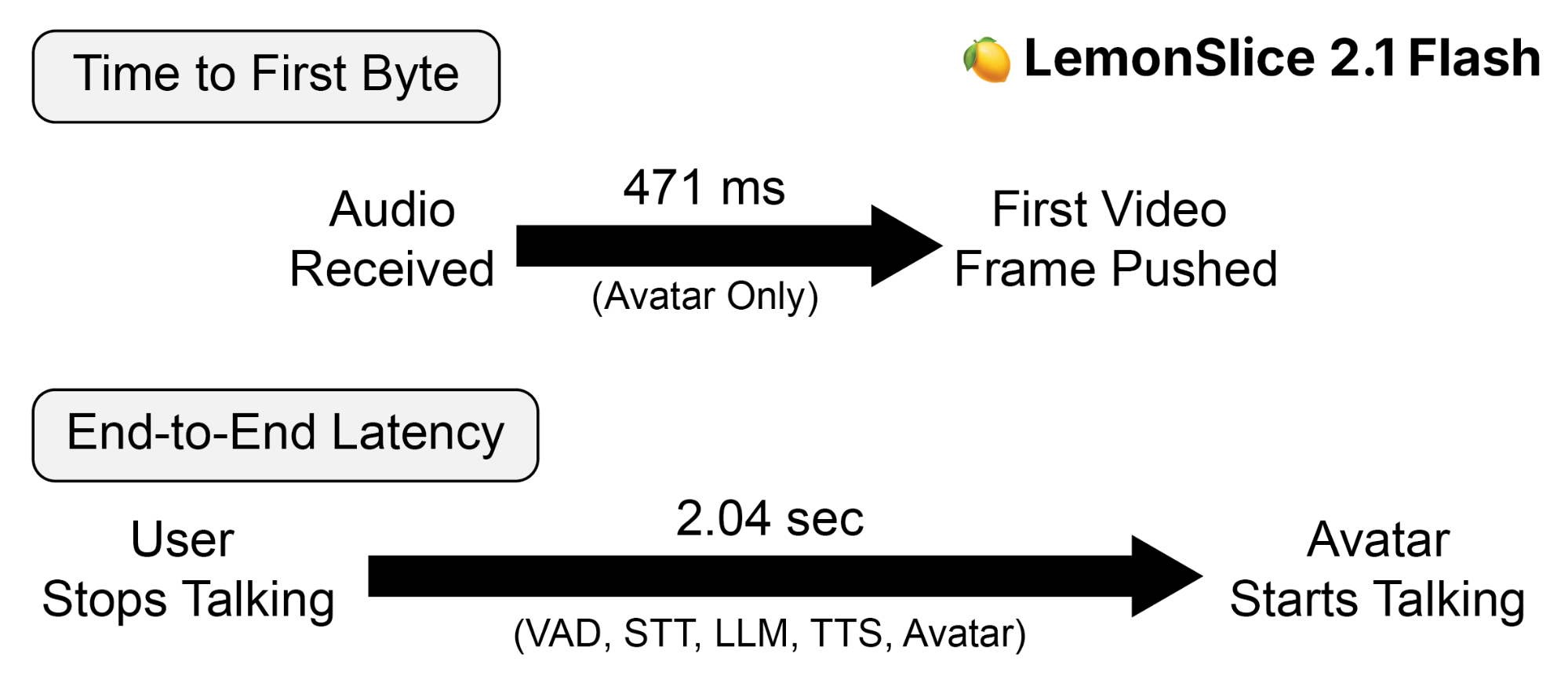
It's fast too. LemonSlice 2.1 Flash responds in 471ms on average, making it the fastest model among major avatar providers in published benchmarks, and users consistently rate the avatars as more expressive and natural to talk to.
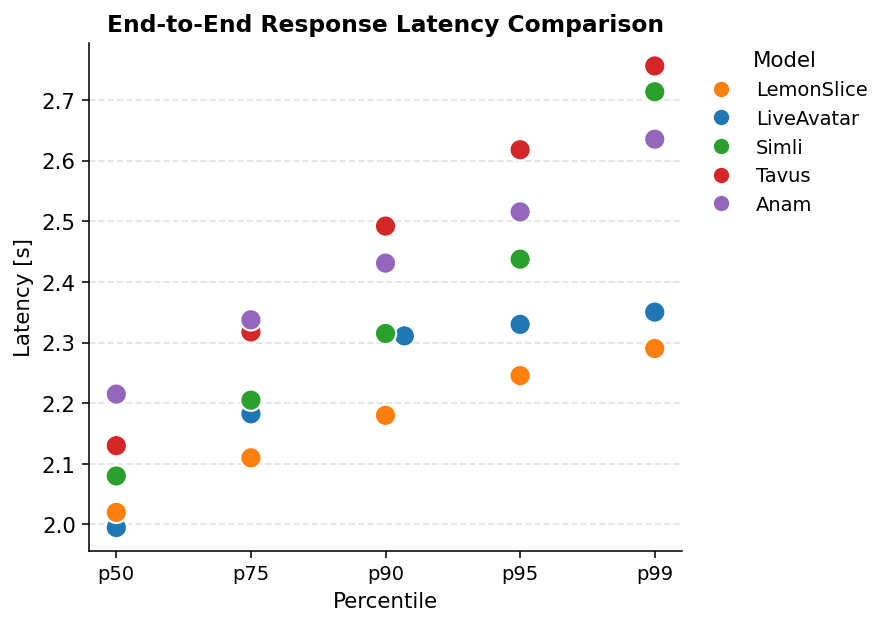
That is why LemonSlice is the better Akool alternative for interactive avatars. Akool's streaming avatars are realistic human presenters, with gestures reserved for an Enterprise-only tier, while LemonSlice generates any character with working hands and controllable emotions.
You can chat with a featured avatar for free, then build your own from $8/month.
LemonSlice vs. Akool: comparison at a glance
Here's how the two stack up side by side:
| LemonSlice | Akool | |
|---|---|---|
| Photorealistic humans | ✅ | ✅ |
| Cartoon and stylized characters | ✅ | ✖️ |
| Non-human characters | ✅ | ✖️ |
| Dynamic hand gestures | ✅ | ✖️ Self-serve plans, gestures listed only for the Enterprise Ultra Avatar |
| Controllable emotions | ✅ Action Engine | ✅ Emotion presets, interactive emotions on Ultra Avatar |
| Clothing and scene swaps | ✅ Mid-conversation image update | ✖️ Clothing Swap works on uploaded images only |
| Custom avatar cost and creation time | $0, instant from one photo, unlimited on every plan | Capped per plan, extra Studio Avatar $249, Ultra Avatar via Enterprise sales |
| Cost per minute | $0.1367/min avatar-only (top self-serve plan) | Credit-based, no published per-minute streaming rate |
| Speed in end-to-end benchmarks | Fastest among major avatar providers | No published latency figure |
| Integrations | LiveKit, Pipecat, Agora, WebSockets, any LLM or voice provider | API from Pro Max up, Zapier listed as coming soon |
| Resolution | 512px standard, HD on Enterprise | ✅ 1080p and 4K streaming, 4K avatar video |
| No-code path | Widget embed, two lines of code | ✅ Full studio with templates, personas, and stock avatars |
| Pre-rendered clip production | ✖️ | ✅ Avatar video, talking photo, face swap, translation |
| Entry price | $8/month | $12/month on annual billing |
Product and pricing information: vendor product and pricing pages, September 2026.
Who should use Akool
Choose Akool for marketing video production at scale. Creative, e-commerce, and localization teams get avatar video, face swap, talking photos, and 155+ language translation in one account, with templates and a no-code studio the whole team can use.
It's also a reasonable way to put a first live avatar on a website or an event floor, because the persona library, the knowledge base included on every plan, and the free streaming minutes get a working avatar in front of people without any code.
Who should use LemonSlice
Choose LemonSlice when the interactive avatar is the product. Consumer-facing experiences, tutors, and companion apps reward expressiveness, and users consistently rate LemonSlice avatars as more natural to talk to.
It's also the better fit for physical installations, because LemonSlice powers some of the most visible in the world, including Microsoft's life-size AI Teddy Roosevelt.
And if you're a developer wiring a face onto an existing voice agent, LemonSlice plugs straight into LiveKit, Pipecat, and Agora, and works with any LLM or voice provider.
The Verdict
Choose Akool if your main job is producing video content. The suite covers avatar video, face swap, talking photos, and translation in one subscription, language coverage is wide, output reaches 4K from the Pro plan, and one credit pool pays for all of it together.
Choose LemonSlice if your main job is an interactive avatar. The avatars are more expressive and natural, with hands and a full body rather than just a talking head. They can be any character in any style, created instantly from a single photo, and the published response times lead the category.
The clearest way to decide: if the avatar performs a script or edits footage, choose Akool. If it holds a conversation you want users to stay in, choose LemonSlice. And if you want to see the difference before you decide, talk to a LemonSlice avatar and judge it for yourself.