

Use a ringing sound and UI
Avatar video takes a few seconds to initialize. A phone-call metaphor works well: users understand ringing, pickup, conversation, and hang-up. Our Quickstart provides a useful template.Handle avatar connect/disconnect events
Read this section if you experience any of the following issues:
- Empty room (user sees black screen)
- User gets no video or audio, but audio/text input are still active
- Avatar disappears
@lemonsliceai/avatar npm package on the frontend to detect when the avatar’s first video frame has rendered, then switch from ringing to your active call UI. Listen for the avatar leaving to return to an inactive state so users can rejoin.
- LiveKit
- Daily (Hosted)
Also listen for
ParticipantDisconnected when the avatar leaves (call completion, idle timeout, errors, etc.).On the backend, wait for the agent to join the room with
wait_for_agent (Python) or waitForParticipant (Node), then call generate_reply() so the avatar does not sit idle before speaking. See the LiveKit starter project for a complete implementation.Handle room errors
Read this section if you experience any of the following issues:
- Avatar fails to join a call
- Crashed calls — avatar leaves or audio cuts out
- LiveKit
- Daily (Hosted)
Listen for
Disconnected events to handle network errors, WebRTC failures, or join failures.Catch pipeline errors
Read this section if you experience any of the following issues:
- Avatar does not speak
- Session dies unexpectedly
- LiveKit
- Daily (Hosted)
Subscribe to
AgentSession error events on your backend. Errors with err.recoverable == False mean the pipeline is dead — end the session gracefully.Handle startup failures
Read this section if you experience any of the following issues:
- The call never connects
- LiveKit
- Daily (Hosted)
The LiveKit starter project monitors agent startup and can send a failure message to the room. Catch it on the frontend:
Check timeouts
Read this section if you experience any of the following issues:
- Avatar suddenly exits a call
- Calls end after the same number of minutes every time
- LemonSlice idle timeout (default 60 seconds) — resets when the avatar is talking
- LemonSlice GPU timeout (default 30 minutes) — contact support@lemonslice.com if you need longer calls
- Third-party timeouts (LiveKit, Daily, ElevenLabs, etc.)
- LiveKit
- Daily (Hosted)
Set
idle_timeout on AvatarSession:Budget your latency
Read this section if your avatar feels slow to respond — including delayed replies after the user finishes speaking.
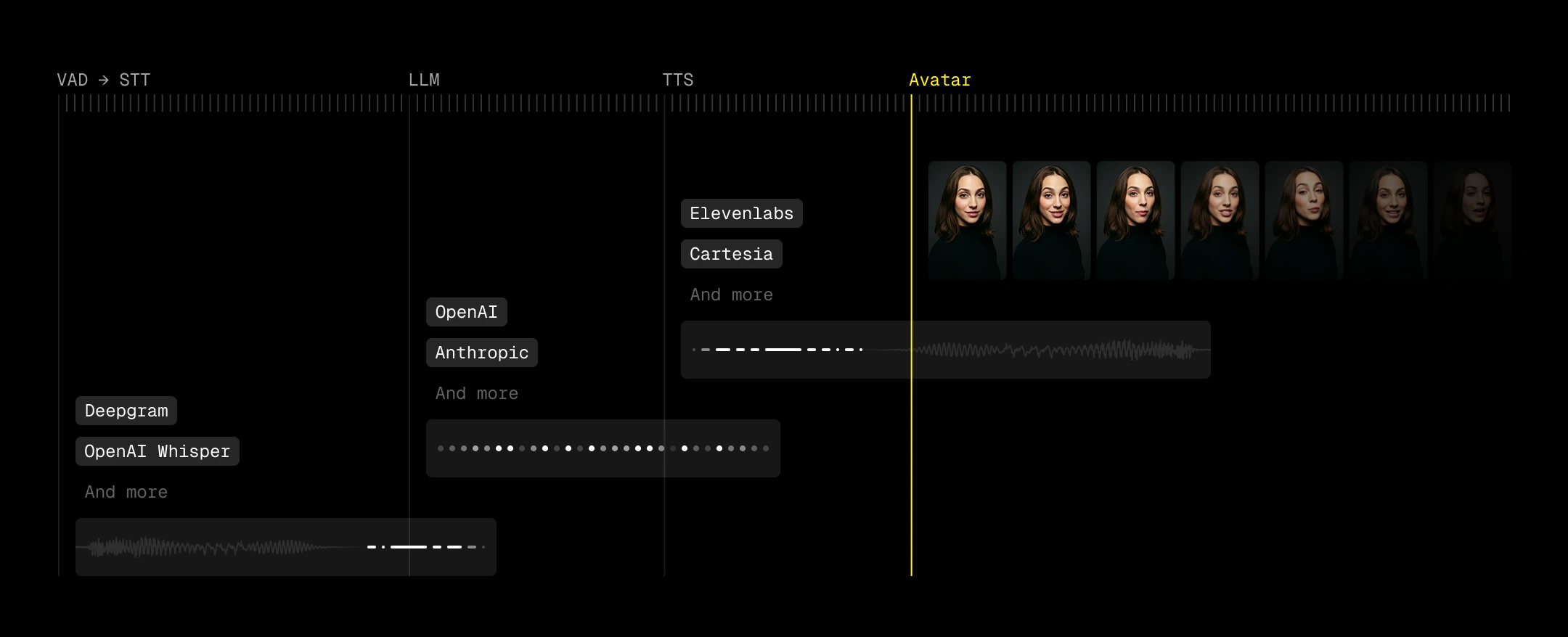
Use VAD to decrease perceived latency
Perceived latency matters more than absolute latency. Voice Activity Detection (VAD) lets you start reacting before a user has fully finished speaking, which effectively pulls your entire pipeline forward. Good turn detection means you can kick off generation as soon as intent is clear.Handle unstable networks
Read this section if you experience any of the following issues:
- Avatar video stutters, freezes, or drops frames for some users
- The same call is smooth on a strong connection and choppy on mobile or congested Wi-Fi
- LiveKit
LemonSlice’s LiveKit integration accepts three encoding options on
AvatarSession: video_codec, scalability_mode, and simulcast. Pick one combination based on the connecting browser’s codec support.- VP9 with SVC when
supportsVP9()is true. Setvideo_codec="vp9"andscalability_mode="L3T3_KEY". - VP8 with simulcast for every other browser. Set
video_codec="vp8"andsimulcast=True.
1
Detect VP9 support on the frontend
Call LiveKit’s
supportsVP9() helper and include the result in the request that starts your LiveKit session with the LemonSlice avatar.2
Pass the encoding options to AvatarSession
Pass VP9 and SVC when the viewer supports VP9. Otherwise pass VP8 and simulcast.On the WebSocket API, LemonSlice accepts the same
video_codec, scalability_mode, and simulcast fields on livekit_properties.Optional: Show a transcription
Displaying transcription can improve usability, especially for catching STT errors and making the agent’s timing feel more predictable. Users can see when their speech has been “accepted,” which reduces ambiguity around when the agent will respond. However, transcription introduces its own UX risks. Many pipelines expose both fast, low-accuracy interim results and slower, higher-accuracy final transcripts (e.g.,interim_results=false to suppress partials for Deepgram). When both are surfaced, users can see text rapidly change or correct itself, which feels unstable and undermines trust. We recommend disabling interim results if you choose to show transcriptions.